
Features and fees
Outdoor Grid vs FareHarbor: features and fees
Compare the parts your shop needs each day, as well as the booking fee. FareHarbor's side comes from marketing.fareharbor.com/solutions/boat-tour, checked on 26 October 2026.
| What you need |  | FareHarbor |
|---|---|---|
| Intended business | Outdoor Grid · Independent, owner-run bike and ski rental shops, ski schools, guided tours and shops with a workshop. | FareHarbor · Tour and activity operators. The page checked is written for boat tour, charter and ferry operators. |
| Monthly software fee | Outdoor Grid · One flat monthly fee for the parts you run, agreed on a call. | FareHarbor · No monthly software fee and no setup fee. |
| Commission on bookings | Outdoor Grid · No commission on bookings. | FareHarbor · A small fee applied at checkout, not published as one number. Costs scale with confirmed bookings. |
| Who pays the online booking fee | Outdoor Grid · Outdoor Grid takes no commission from the shop or its guests. | FareHarbor · The guest covers the fee at checkout, on top of your price. |
| Booking website | Outdoor Grid · Your own booking website, in your colours, where guests pick dates and gear and book. | FareHarbor · Online booking listed. |
| Sizes before arrival | Outdoor Grid · Height, weight, shoe size and level collected when guests book. Binding setting recorded at handover. | FareHarbor · Rental gear with sizing not listed on that page. |
| Workshop and repairs | Outdoor Grid · One repair board for customer bikes and your own fleet. | FareHarbor · Repair board not listed on that page. |
| Shop stock and till | Outdoor Grid · Shop stock and till in the same system. | FareHarbor · A point of sale listed. |
| Team rota | Outdoor Grid · Shifts, guides and vans. | FareHarbor · Crew roles on departures listed. |
| Waivers | Outdoor Grid · On the tablet or the trip link. | FareHarbor · Waivers listed. |
| Travel agents and resellers | Outdoor Grid · GetYourGuide and Viator connections are in testing. | FareHarbor · Travel agent connections listed. |
| Getting started | Outdoor Grid · Setup with your team. Agree which records come across and check real bookings before relying on the system. | FareHarbor · Ask FareHarbor's team for a demo. No setup fees, the page says. |
FareHarbor source checked 26 October 2026. “Not listed” describes that page, not a confirmed absence from FareHarbor. Source: marketing.fareharbor.com/solutions/boat-tour. Outdoor Grid's card payments run through Stripe, which charges its own card fees. No booking commission does not mean free card processing.
Which is the better fit for your shop?
Outdoor Grid is worth considering if:
- You rent bikes, e-bikes, skis or snowboards and want bookings connected to the desk and workshop.
- You run lessons, guided tours or shuttles alongside rentals.
- You want sizing, repairs, stock, the till and the team's rota in one system.
- You want a software fee that does not increase with booking volume.
More on our bike rental software, ski rental software and software for ski schools.
FareHarbor may be the better fit if:
- You sell boat trips, tours or tickets and rent nothing, so a tour booking tool may be enough.
- Travel agent connections are central to your business. FareHarbor lists them; Outdoor Grid's GetYourGuide and Viator connections are in testing.
- You want no monthly software fee and are happy for guests to cover a fee at checkout.
What Outdoor Grid connects to today: integrations.
Bring the parts your shop needs to run. Oli will show you how they fit together.
Pricing
FareHarbor pricing: check the fee your guests pay
FareHarbor's boat tour page said there are no monthly software fees and no setup fees when checked on 26 October 2026, and that the operator does not pay FareHarbor's fees out of pocket. A small fee is applied during checkout, and the guest covers it.
The page does not publish the fee as one number, so we do not quote one. Take it from one of your own bookings.
Outdoor Grid takes no commission on bookings. Its price is one flat monthly fee for the parts your shop runs, agreed with Oli on a call. Stripe's card fees are separate.
Compare that quoted monthly fee with your own FareHarbor plan and fees. A booking fee alone does not tell you which system costs less overall.
Source: marketing.fareharbor.com/solutions/boat-tour, checked 26 October 2026.
Bring your current plan and online booking figures. Oli will go through them with you.
Check your last booking
Your numbersFareHarbor's page does not publish the fee, so take it from a real booking.
Type what the guest paid, from your receipt.
FareHarbor's pricing from marketing.fareharbor.com/solutions/boat-tour, 26 October 2026. Leave card fees out: a card fee applies with any system.

Our first customer
Built with Evolve Finale, a bike rental and tour shop
Evolve Finale runs bike and e-bike rental, guided tours, shuttles and a workshop in Finale Ligure.
Guests put a tour and a bike in one basket on Evolve's own website. The same booking runs the shop.
The product
See how a booking runs through your shop
These are real product screens using a sample shop's data. Follow the booking from the guest's website to sizing, the day's desk and the repair board.
Guests book on your shop's website
Guests choose dates and gear, add lessons or days out, and see the total as they choose.
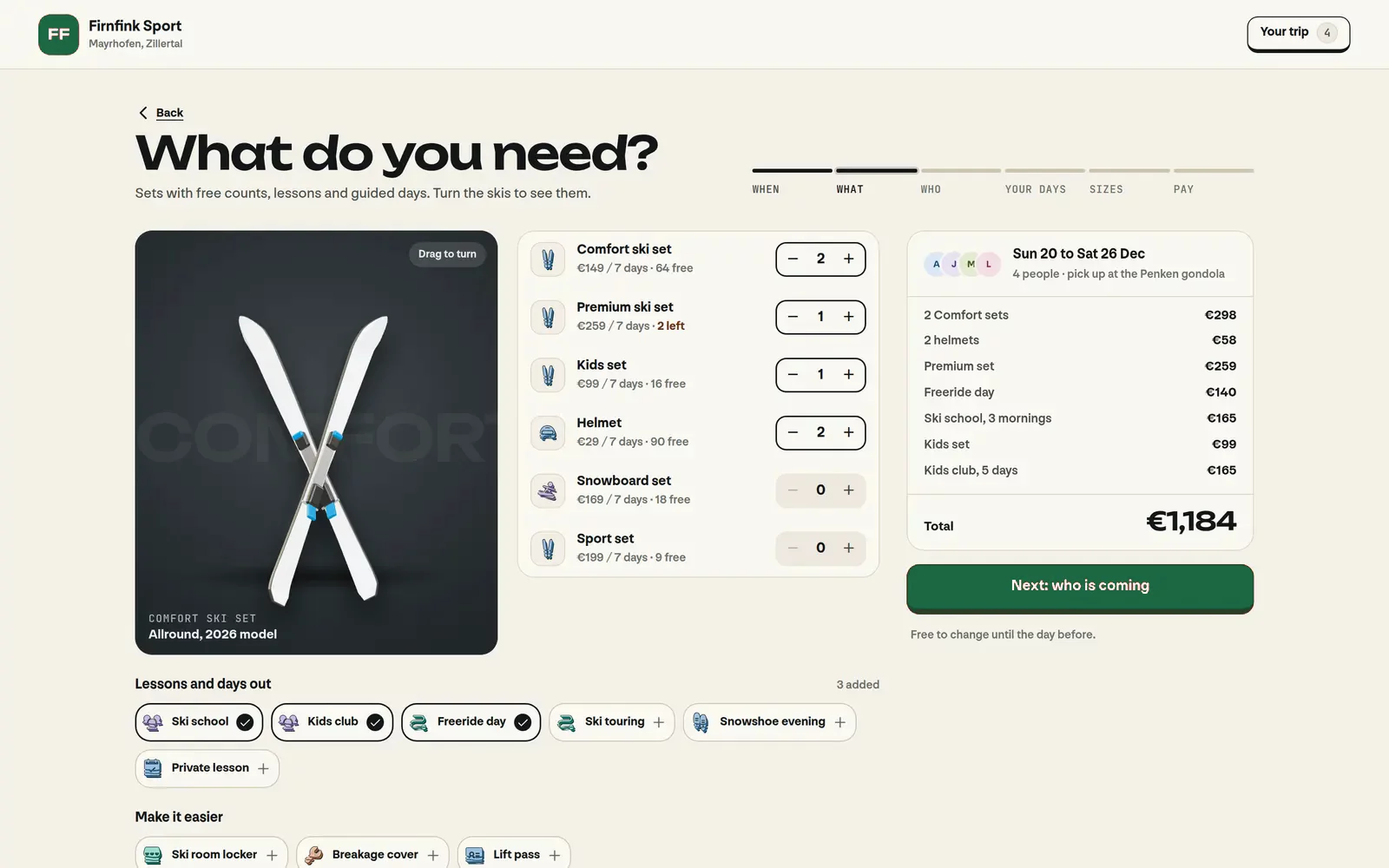
Sample shop booking website. This is demonstration data. Sizes arrive with the booking
Guests give height, weight, shoe size and level before they arrive. The desk records the binding setting at handover.
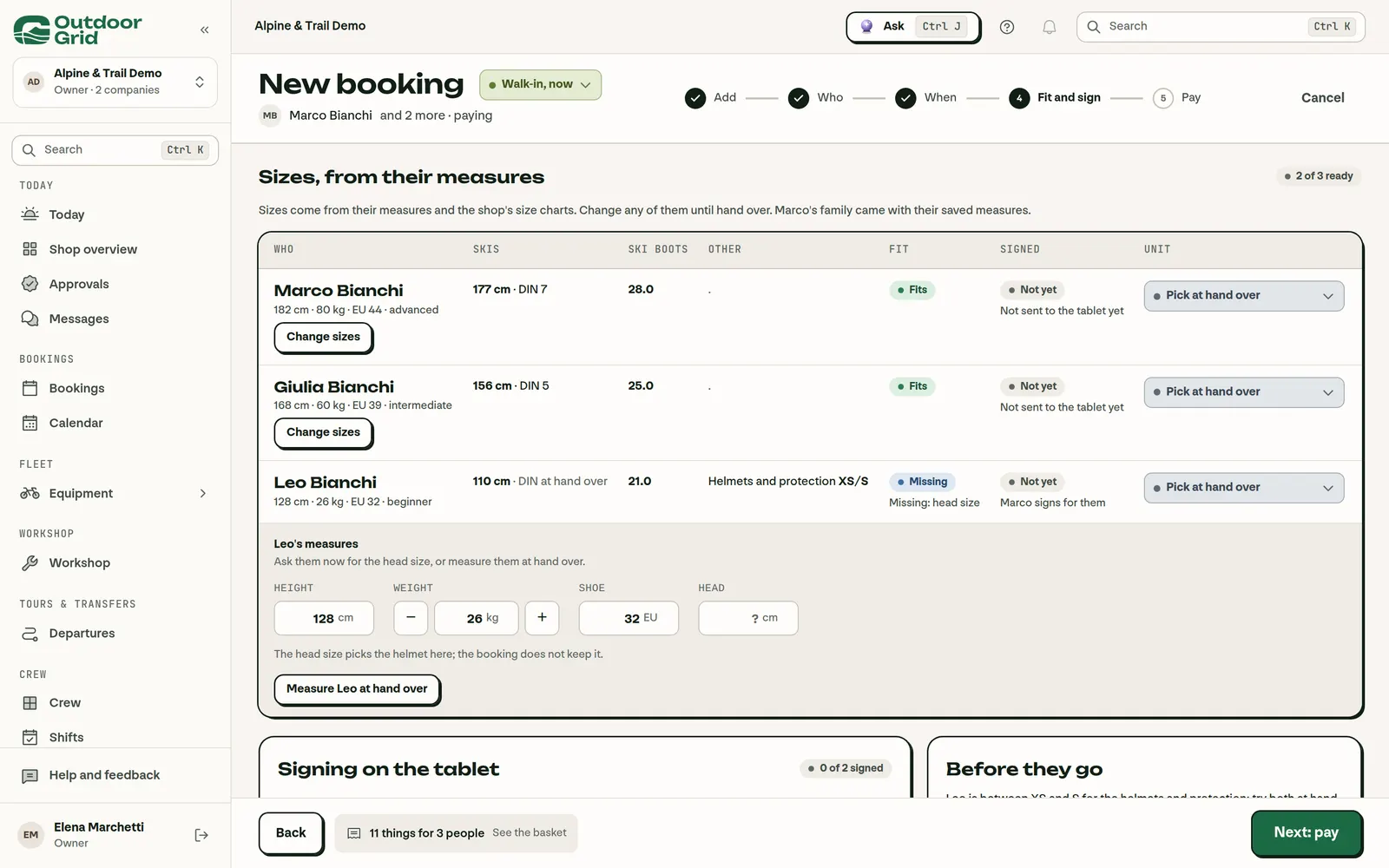
Sample booking with guest measurements and gear selection. The desk sees the whole day
Pickups, returns, walk-ins and tours sit on one board, with the guide and van for each trip.
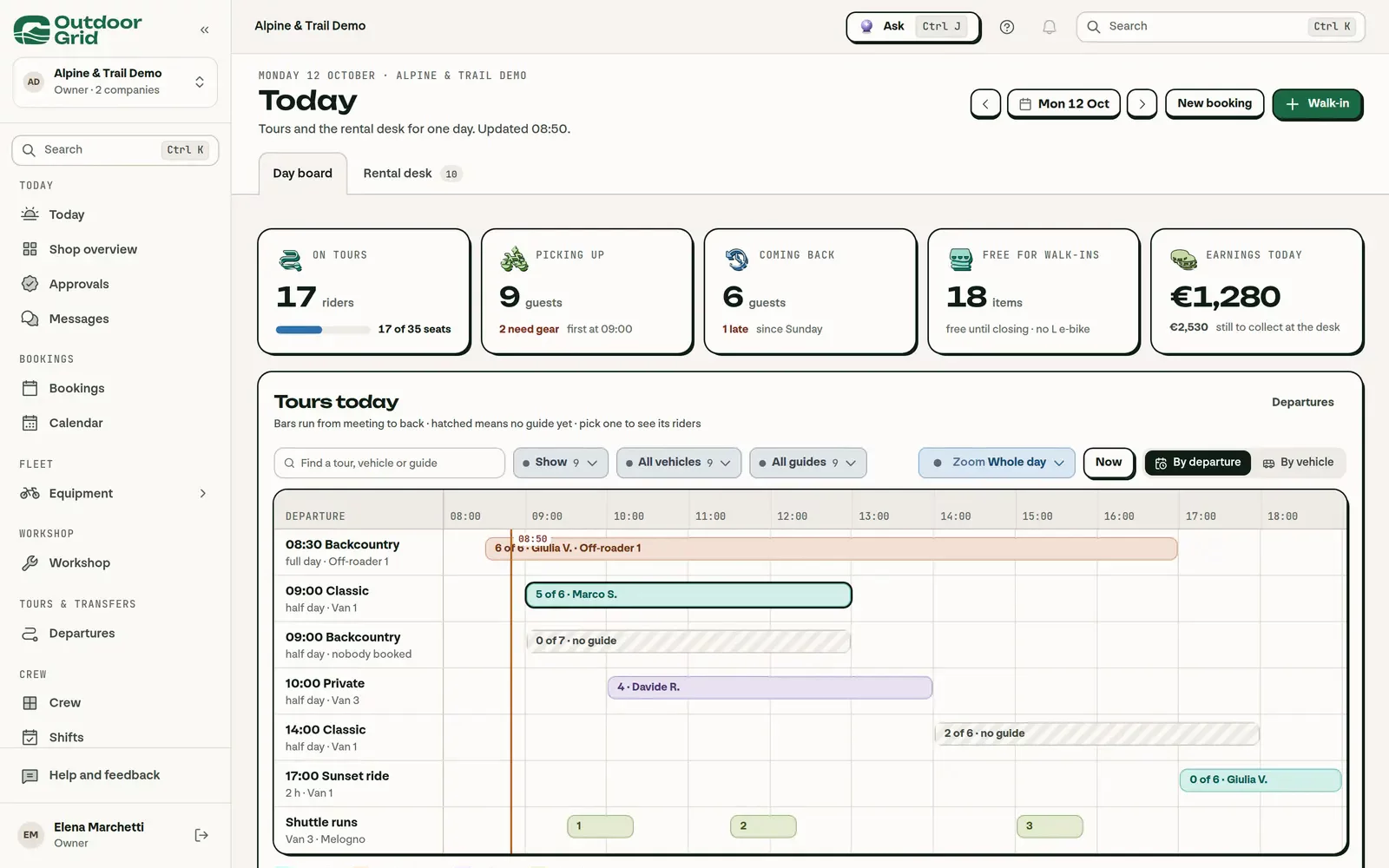
Sample day board for the rental desk and team. Rentals and repairs stay connected
See what is out with a guest, at the workshop or ready on the rack. Customer bikes and your own fleet use the same repair board, from taken in to ready to collect.
Rental gear with sizing and a repair board were not listed on FareHarbor's boat tour page when checked on 26 October 2026.
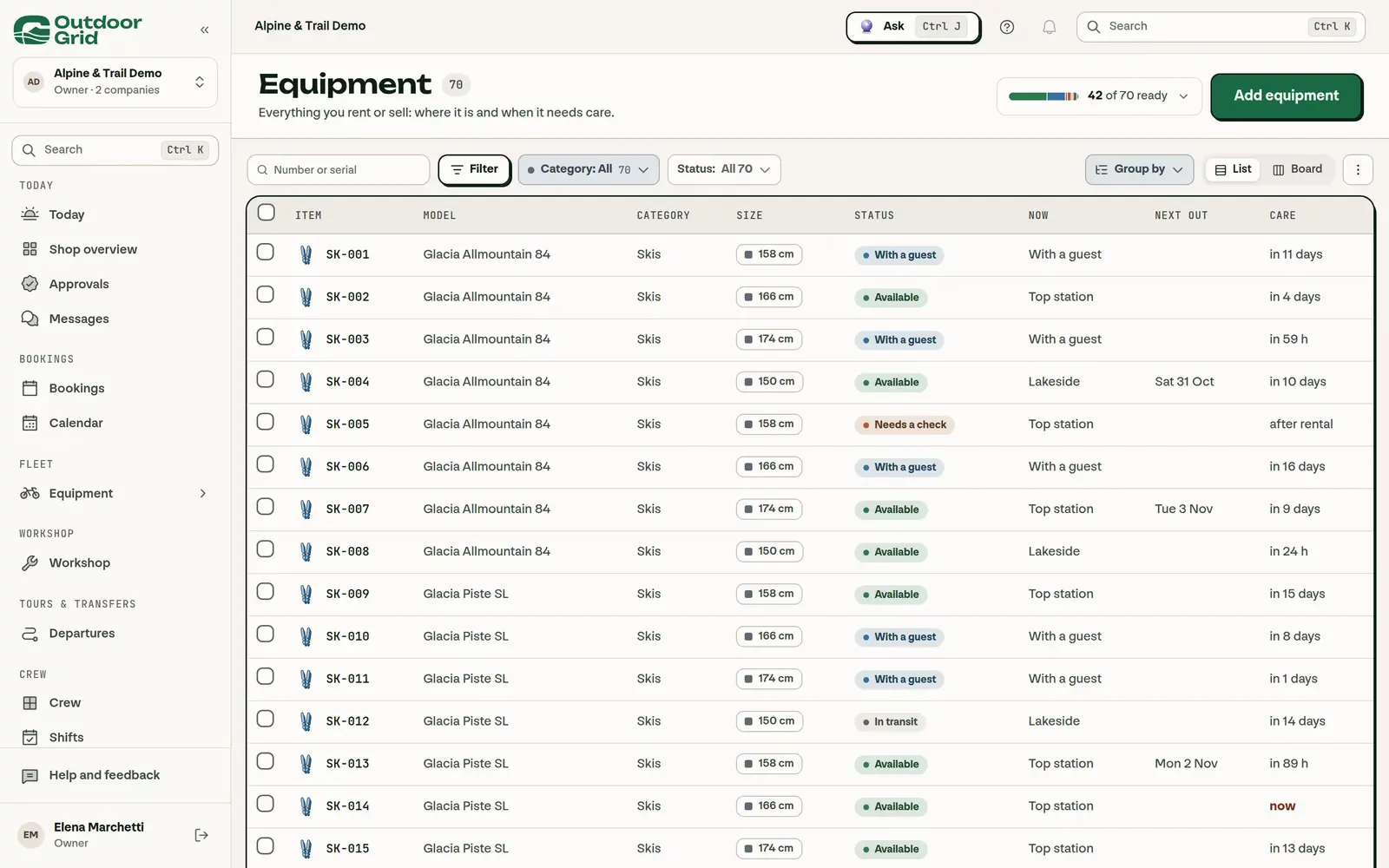
Sample equipment board showing each item's status.

Stock and the till
Shop stock and the till alongside bookings.
Your team's days
Shifts, guides and vans on the same calendar as the bookings.
The guest assistant
Answers on WhatsApp and Instagram with your shop's own prices and stock.
More on the guest assistant.
Switching
Switching from FareHarbor, before your season
We set the shop up with you and check real bookings before your team relies on Outdoor Grid. Keep FareHarbor running alongside it until your team trusts the new system.
Set up your booking website
We build it around your products and prices. Try a test booking and check the flow.
Agree which records come across
We agree the records to move from FareHarbor or a spreadsheet, then move and check them with you.
Check your real working day
Your team checks real bookings and the desk workflow while FareHarbor remains running.
Decide when to switch
Switch off the old system when your team is ready and the agreed checks are complete.
What comes across
Our spreadsheet brings your products and prices, tours, timetables and upcoming rental bookings with their customers. You see what would come in before anything is saved, and no email goes to your guests. Past and cancelled bookings stay where they are. A FareHarbor bookings export can also bring upcoming bookings and the customers on them.
The two systems do not sync while both run, so agree with Oli how bookings taken in the meantime come across.
On the call, tell Oli about future bookings and anything your team needs to keep working. Agree the migration scope before committing to the switch.
Questions about FareHarbor and Outdoor Grid
What is a FareHarbor alternative for a bike rental shop?
Outdoor Grid is an option for independent bike and e-bike rental shops, including shops that also run tours and a workshop. It combines a booking website, rentals, repairs, stock, the till and the team's rota. It charges one flat monthly fee agreed per shop and takes no commission on bookings.
Can Outdoor Grid run ski rental and a ski school?
Yes. Outdoor Grid covers ski and snowboard rental, sizing before arrival, and lessons with their guide on the calendar. Guests give height, weight, shoe size and level when booking. The desk records the binding setting at handover.
How much does FareHarbor cost?
FareHarbor's boat tour page, checked on 26 October 2026, said there are no monthly software fees and no setup fees. A small fee is applied at checkout and the guest covers it. The page does not publish the amount. Check the page before deciding.
Who pays FareHarbor's booking fee?
On FareHarbor's boat tour page, the guest covers a small fee applied at checkout. The amount is not published there. Look at your last booking or statement to see what your guests paid (checked 26 October 2026).
Does Outdoor Grid add a fee for my guests at checkout?
No. Guests pay your price. Outdoor Grid takes no commission on bookings. The shop pays one flat monthly fee for the parts it runs, and Stripe charges its own card fees.
How much does Outdoor Grid cost?
Outdoor Grid charges one flat monthly fee for the parts your shop runs. Oli agrees the number with you on a 45 minute call. Outdoor Grid takes no commission on bookings. Stripe charges its own card fees.
Can Outdoor Grid run my workshop as well as bookings?
Yes. Customer bikes and your own fleet use one repair board, from taken in to ready to collect. The workshop sits in the same system as bookings, stock and the team.
Can I move future bookings from FareHarbor to Outdoor Grid?
We agree which records come across, move them with you and check real bookings before your team relies on Outdoor Grid. Upcoming rental bookings and their customers can come in from a spreadsheet, and you see what would come in before anything is saved. A FareHarbor bookings export can also bring upcoming bookings and the customers on them. Discuss your future bookings with Oli so the migration scope is agreed before switching.
When might FareHarbor be the better fit?
FareHarbor may be a better fit if you sell tours or tickets and rent nothing, rely on travel agent connections, or want no monthly software fee with guests covering a fee at checkout. Outdoor Grid's GetYourGuide and Viator connections are in testing.
Does Outdoor Grid connect to GetYourGuide and Viator?
Outdoor Grid's GetYourGuide and Viator connections are in testing. If either is essential to your business, discuss that requirement with Oli before deciding.
Book a 45 minute call with Oli
Tell Oli what you rent, which parts of the shop you run and what you need from a new system. He will show you the booking website and the system behind the desk, discuss switching from FareHarbor, and agree the flat monthly fee for your shop.
If you have them, bring your current plan and last year's online booking figures.
Related comparisons
Outdoor Grid is not affiliated with FareHarbor. Product names belong to their owners. FareHarbor information was checked on 26 October 2026. Prices and features can change. Check FareHarbor's own page before deciding.